 APKBees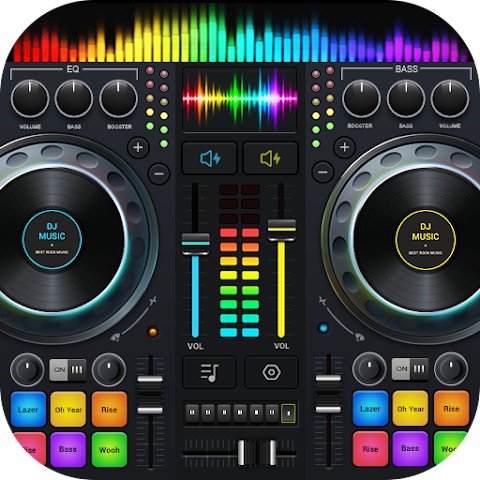
DJ Music mixer - DJ Mix Studio
by Easyelife
Loading...
Share App
Share DJ Music mixer - DJ Mix Studio with friends
https://apkbees.com/apps/dj-music-mixer
SHARE ON
Images
( Tap any image to open it )
DJ Music Mixer: Turn Your Android Phone Into a Full DJ Studio
Most people think DJing requires expensive gear. A console that costs thousands. A studio setup. Hardware you spend months saving for. DJ Music Mixer proves all of that wrong. This free DJ music mixer app puts real mixing tools right on your Android phone and lets you start creating from the moment you download it.
Over 50 million people have downloaded DJ Music Mixer. That number keeps growing every single day. Beginners pick it up because it is easy to learn. Experienced creators stick around because it has real depth. And everyone in between finds exactly what they need to mix songs, build beats, and have fun with music.
If you have ever wanted to try DJing, this app is where you start.
What Is DJ Music Mixer
DJ Music Mixer is a free Android app that lets you blend tracks, experiment with effects, and learn real mixing without hardware. It sits between a hobby mixer and a working entry level mixing setup.
The app gives you two virtual turntables, a crossfader, BPM detection, remix pads, a five band equalizer, and 28 free sample packs all inside a clean and responsive interface. You load your songs from your phone, adjust your tempo, and start mixing. Everything you need is right there on the screen. No complicated setup. No tutorials required before you can do something useful.
DJ Music Mixer is designed for both professional and novice DJs. Whether you are a seasoned pro or just getting started, the app has everything you need to create amazing DJ mixes. Google Play
That balance between simplicity and real capability is what makes DJ Music Mixer different from the hundreds of other DJ apps sitting in the Play Store.
Two Virtual Turntables and a Real Crossfader
The core of any DJ music mixer is how it handles two tracks at once. DJ Music Mixer gives you two full virtual turntables on screen. Each deck loads a separate song from your phone. The crossfader in the center blends between them exactly the way a physical DJ mixer would.
Pull the crossfader left and the first track takes over. Pull it right and the second takes over. Work it in the middle and both tracks play together. That back and forth movement is the foundation of live DJ mixing and this app nails it.
DJ Music Mixer includes a real crossfader with two virtual turntables, up to six hot cues, loops from 1/64 to 128, remix pads, 28 sample packs, a five band EQ equalizer and bass boost, and sound effects.
Six hot cues per deck let you mark key moments in a track and jump to them instantly. You set a cue at the drop. Another at a vocal hit. Another at the breakdown. Then you trigger them live as the mix builds. That kind of control turns a basic blend into something that actually sounds like a performance.
Loop controls go from 1/64 all the way to 128 beats. Short loops create a rhythmic stutter effect. Long loops hold a section while you set up your next move. Both have their place depending on the genre and the moment.
BPM Detection That Keeps Your Mix Tight
Matching the tempo of two songs is one of the first real challenges in DJing. When two tracks are out of sync the mix sounds off and listeners feel it immediately. DJ Music Mixer solves this with built-in BPM detection that reads the beats per minute of each track automatically.
Recent updates to DJ Music Mixer introduced a precise beat sync feature so your transitions stay tight from the moment you load a track.
The app shows you the BPM of each track on screen. You can let the sync feature match them automatically or adjust pitch and tempo manually on each deck. Speed a track up. Slow it down. Change the key without affecting the tempo. Every adjustment happens in real time and you hear the result immediately.
This is what separates a good mix from a great one. Tight timing. Controlled transitions. Songs that flow into each other instead of crashing together.
28 Free Sample Packs Built Into the App
DJ Music Mixer comes loaded with 28 free sample packs including DJing, gunshot, boom, clap, boing, and scratch sounds built directly into the remix pads.
You tap the pads to layer sounds over your mix in real time. Drop a clap on the two and four. Fire a scratch effect at the peak of a buildup. Add a boom under the drop to give it extra weight. These sounds transform a basic transition into something that has real energy and personality.
The pads sit right where your thumbs land naturally when you hold your phone. You do not need to reach across the screen or take your eyes off the decks to hit them. They respond instantly with no noticeable delay. That responsiveness matters because in live mixing even a half second lag throws everything off.
The 28 sample packs cover a wide range of sounds and genres. Hip hop, EDM, trap, house, afrobeat all have something useful in the collection. You pick what fits the vibe you are building and add it when the moment is right.
Five Band Equalizer and Bass Boost
A DJ music mixer is only as good as its sound shaping tools. DJ Music Mixer gives you a five band equalizer on each deck so you can control the low end, low mids, mids, high mids, and highs of every track independently.
This matters more than most beginners realize. When two bass-heavy tracks overlap the mix turns muddy. Cutting the low end on the outgoing track before you bring in the next one solves that instantly. The five band EQ in DJ Music Mixer gives you that control on every single transition.
The bass boost goes further for moments when you want maximum impact. Turn it up and the low frequencies hit harder. This works especially well during drops and peak moments in a set.
Some users download DJ Music Mixer specifically to chop vocals, enhance the bass track, and make songs sound heavier through headphones. The EQ and bass boost are exactly the tools that make that possible. VirtualDJ
Record Your Mix and Share It
Everything you create in DJ Music Mixer can be saved and shared. Hit the record button before you start and the app captures your full session as a high quality MP3 file. Your crossfader movements, pad hits, EQ adjustments, tempo changes all go into the recording exactly as they happened.
DJ Music Mixer lets you record mixes and scratch routines using either the microphone or internal audio recording on Android 10 and above.
Once you have a recording you are happy with, share it wherever you want. Send it to friends. Post it on social media. Build a library of your sessions over time and watch your skills grow from mix to mix. The recording feature turns this DJ music mixer from a practice tool into a genuine creative output platform.
What Makes DJ Music Mixer Worth Using Every Day
Here is what you actually get when you open DJ Music Mixer and start a session:
Two virtual turntables with full crossfader control and real time tempo adjustment
BPM detection that reads your tracks automatically and a beat sync feature that locks them together
Six hot cues per deck to mark and trigger key moments in any song
Loop controls from 1/64 to 128 beats for creative rhythmic effects and smooth transitions
28 free sample packs with instant-response remix pads for layering sounds live
A five band equalizer and bass boost on each deck for complete sound control
HD mix recording in MP3 format so every session can be saved and shared
That is a complete toolkit. Not a preview. Not a demo. The full thing, free to use from the moment you install the app.
Who DJ Music Mixer Is Built For
People who use DJ Music Mixer range from complete beginners learning about rhythm and timing to experienced creators who want a portable setup to practice transitions wherever they are. VirtualDJ
If you are new to DJing, start simple. Load two tracks. Practice blending them with the crossfader. Once that feels natural, turn on BPM detection and start syncing tempos. Then work in the hot cues. Then the sample pads. You build skill one layer at a time and DJ Music Mixer grows with you through every stage.
If you already have DJ experience, the depth is there when you need it. The app provides the essential mixing tools including crossfader, loops, sample pads, tempo, beat alignment, and effects, and lets you test ideas immediately without any workflow imposed on you.
Creators who do not have access to a home setup get real value from this app too. It is portable enough to use on a commute. Quiet enough to practice on headphones in any room. Powerful enough to capture ideas and build full mixes on the go.
Free Version vs In-App Purchases
The free version of DJ Music Mixer gives you access to everything that matters.
Both turntables and the crossfader
BPM detection and manual tempo controls
Six hot cues per deck
Full loop controls
All 28 sample packs
Five band equalizer and bass boost
HD recording
Your full device music library
Advanced features available through in-app purchase include additional sound effects, better music management with filters for artists, albums, and folders, and playlist creation tools.
Latest Version and App Performance
Version 2.6.5 of DJ Music Mixer brings various UI adjustments for a better overall experience along with fixes for known bugs to improve stability. Earlier updates added faster app launch speeds, improved BPM accuracy, and performance optimization for a lighter footprint.
DJ Music Mixer runs on just 33 MB. It does not drain your battery or demand the latest flagship hardware. Android 6.0 and above means the app works on a huge range of devices including older and mid-range phones that other DJ apps struggle to run smoothly on.
The developer Easyelife stays active with updates and responds to user feedback. Users consistently praise the app for having no ads disrupting the experience and a friendly interface with plenty of options.
DJ Music Mixer is not one of those apps that ships with big promises and then goes quiet. It keeps improving and the update history shows that clearly.
Why DJ Music Mixer Has 50 Million Downloads
That number did not come from a marketing push. It came from people downloading DJ Music Mixer, actually using it, and finding that it delivered on what it promised.
DJ Music Mixer lets you blend tracks, experiment with effects, and learn real mixing without hardware. It is perfect for beginners building skills and casual users who want real creative control over their music. DJ.Studio
Most free DJ apps either go too basic and leave you wanting more, or go too complex and overwhelm you before you even play a track. DJ Music Mixer hits the balance that works for real people with real phones who just want to make music sound good.
No account required. No internet connection needed. No ads interrupting your session. You download the app, open it, and start mixing. That straightforward experience is exactly why 50 million people chose DJ Music Mixer and why new users keep downloading it every single day.
Frequently Asked Questions
Q. Is DJ Music Mixer free to use?
Yes. DJ Music Mixer is free to download and the core features are free to use. Both turntables, the crossfader, BPM detection, sample pads, equalizer, and recording are all included at no cost. Some advanced features are available through in-app purchases.
Q. What Android version does DJ Music Mixer need?
DJ Music Mixer works on Android 6.0 and above. It is compatible with a wide range of phones and tablets.
Q. Can I use my own music in DJ Music Mixer?
Yes. The app gives you direct access to all music stored on your device. Browse by track, artist, album, or folder and load any song onto either deck.
Q. How do I record my mix in DJ Music Mixer?
Tap the record button before you start. The app saves your session as an MP3 file. On Android 10 and above, internal audio recording is available. On other versions, microphone recording works.
Q. Does DJ Music Mixer work without internet?
Yes. DJ Music Mixer works fully offline. Your music library lives on your device so no internet connection is needed to mix, record, or use any feature.
Q. Is DJ Music Mixer good for complete beginners?
Absolutely. The interface is clean and the controls are clearly laid out. Most new users are mixing tracks within minutes of opening the app for the first time.
⚠️ Disclaimer
This article is written for informational and educational purposes only. We are not the developer or owner of DJ Music Mixer and have no affiliation with the app or its creators. All information is based on publicly available data at the time of writing.
Features
Two virtual turntables with a real crossfader
Automatic BPM detection with precise beat sync
Up to six hot cues per deck
Loop controls from 1/64 to 128 beats
28 free sample packs including boom, scratch and clap sounds
Five band equalizer and bass boost
HD mix recording in MP3 format
Adjustable pitch and tempo on each deck
Full offline access to your device music library
Lightweight 33 MB app for Android 6.0 and above
Clean intuitive interface
Regular updates and bug fixes
App Info
Version
2.6.5
Size
33 MB
Category
Music
Requires Android
Android 6.0+
Last Updated
30 May 2026
Price
Free
Developer
Easyelife
Downloads
504K+
Rating
4.7 / 5 ( 41 )